
Your website works. But who’s taking care of it? The real cost of skipping Website Maintenance
A website can look perfectly fine while problems build up behind the scenes. Learn the real business cost of skipping maintenance and why ongoing website care matters.
Your website loads. The menu works. The form is there. Nothing seems broken. Perfect.
But there’s one question many companies don’t ask until something goes wrong:
Who is actually taking care of your website?
Because having a website online does not necessarily mean it’s healthy.
Behind a site that “looks fine,” there may be pending updates, plugins no one is monitoring, forms that have stopped sending emails, mobile issues, backups that have never been tested, or small errors that simply haven’t become visible to your customers yet.
And that’s the point: maintaining a website has a cost, but not maintaining it does too.
The difference is that one is usually planned. The other tends to show up at the worst possible time.
Your website is online. That doesn’t mean everything is fine
Think about it this way: a car can start every morning and still get you from point A to point B. That doesn’t mean you can ignore the oil change, brakes, or tires forever.
A website works in a similar way.
It may continue running while small issues begin to pile up: outdated components, mobile errors, broken links, performance issues, or integrations that no longer work the way they used to.
The problem is that these issues rarely come with an alert saying, “Hi, your website needs maintenance.”
They simply accumulate.
Being online and being properly maintained are two different things.
What does website maintenance actually mean?
Website maintenance is not just about making changes when someone requests them. It also means taking care of the technical environment so the site remains stable, secure, and useful to the business.
This can include:
- WordPress, plugin, and theme updates,
- security and access reviews,
- backups,
- performance checks,
- testing forms and website functionality,
- small adjustments and continuous improvements.
The goal is not to log into WordPress every day just to “see what happens.” The goal is to have a clear routine that helps detect issues before they become emergencies.
The cost you see and the cost you don’t
Maintenance has one particular characteristic: its cost is visible. You know exactly what you’re paying for support, reviews, or improvements.
The cost of not maintaining a website is usually hidden.
Until it isn’t.
A form could be costing you opportunities
Your website may look perfectly fine, your campaigns may be running, and people may be visiting the site… but if your contact form has stopped sending emails, the issue can go unnoticed for days or even weeks.
Marketing might assume the campaign isn’t generating leads. Sales might think it’s simply been a slow month. But in reality, people were trying to reach the company.
That’s why it’s worth periodically checking your main conversion points, including contact forms, WhatsApp buttons, email notifications, and CRM integrations.
A broken form may look like a small technical issue, but for the business, it can mean lost opportunities.
In eCommerce, the impact can be even greater
In an online store, the website is a direct part of the sales process. A small error can have immediate consequences.
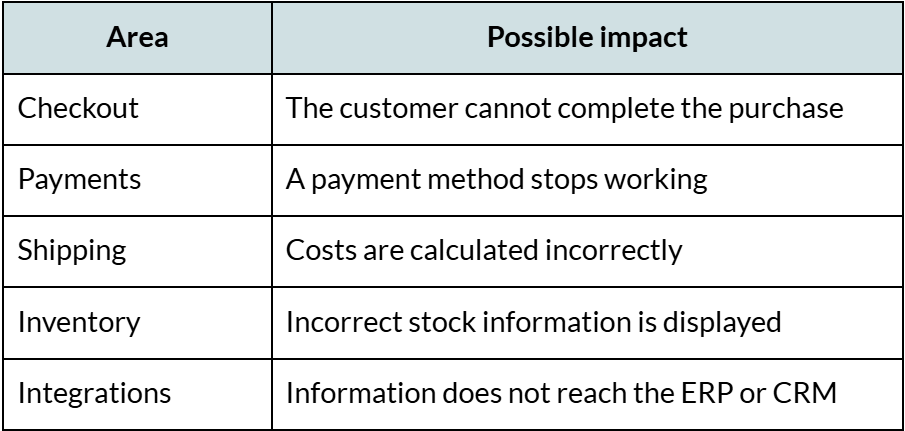
In these cases, maintenance stops being just a technical task and becomes part of the commercial operation.
An emergency rarely happens at a convenient time
Yesterday everything worked. Today the website won’t load, right when there’s an active campaign, a promotion, or customers trying to make a purchase.
At that point, we’re no longer talking about preventive maintenance. We’re talking about diagnostics, recovery, and urgent fixes.
And that highlights an important difference:
Maintenance usually has a predictable cost. An emergency usually doesn’t.
Beyond the technical cost, there may also be wasted ad spend, paused sales, lost opportunities, and hours of internal time spent trying to figure out what happened.
Your website ages too
A website doesn’t need to be broken to start falling behind.
Technology changes, users change, and your business changes too.
A website that represented the company perfectly three or four years ago may no longer be enough if you now offer new services, serve new markets, or need different functionality.
Maintenance also allows for small, continuous improvements, such as:
- updating information,
- improving calls to action,
- optimizing images,
- fixing mobile issues,
- adjusting forms,
- improving navigation.
But it also helps identify when small fixes are no longer enough.
Maybe you don’t need another adjustment. Maybe you need a redesign.
Part of taking care of a website is knowing when it still makes sense to optimize what you already have and when it’s time to evolve the platform.
Security: problems often start with small details
There’s no need to picture a movie scene with hooded hackers.
In many cases, the risks start with much more ordinary things:
- a plugin that stopped receiving updates,
- a password that has been shared for years,
- a former employee who still has access,
- an outdated WordPress version,
- or a backup that has never actually been tested.
Individually, these may look like minor details. The problem begins when they accumulate over months or years without proper oversight.
That’s why website security works best as an ongoing process: reviewing access, keeping components updated, and having reliable backups in place.
It’s not about constantly expecting an attack. It’s about reducing unnecessary risks and having a plan if something happens.
Maintenance also affects SEO and visibility
A technically healthy website also creates better conditions for users, search engines, and AI systems to access and understand its content.
Issues such as slow loading times, broken links, server errors, poor mobile experiences, or outdated content can affect the user experience and make it harder for the website to maintain visibility.
That doesn’t mean website maintenance will automatically put you at the top of Google.
But it does mean that a stable, fast, and well-structured website gives you a much stronger foundation for SEO, content, and digital visibility.
If something breaks tomorrow, who handles it?
It sounds like a simple question:
If something stops working on your website tomorrow, who takes care of it?
If answering that means searching old emails, asking around in several group chats, or contacting “the person who used to handle that,” then there may already be something worth reviewing.
It’s common for website management to become fragmented over time: one person manages the domain, someone else handles hosting, an agency built the site years ago, someone on the team still has WordPress access, and another provider installed an integration that nobody wants to touch “just in case.”
The problem starts when everyone knows one part, but no one is actually responsible for the website as a whole.
That’s why, beyond plugins, updates, and backups, one of the most important aspects of website maintenance is having clear ownership: knowing who reviews the site, who responds when something goes wrong, and who can take action without starting an internal investigation every time an issue appears.
Reactive vs. preventive website maintenance
There are two very different ways to take care of a website.
The first is to wait until something breaks and then take action: “If it stops working, we’ll call someone.” That’s reactive maintenance. It may seem perfectly reasonable while everything is running smoothly, but it becomes much less convenient when the problem appears during a campaign, a sales season, or another important business moment.
Preventive maintenance follows a different approach: review the site periodically, keep its components updated, monitor key functionality, and address small issues before they grow.
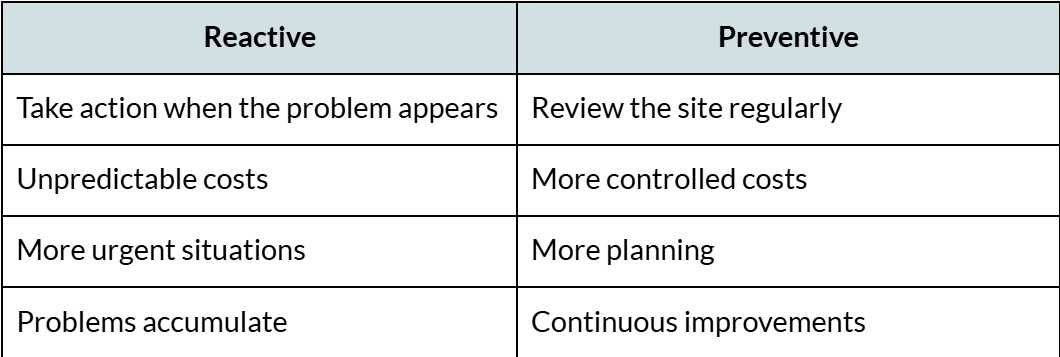
No maintenance service can guarantee that a problem will never happen. But it can reduce risk and help prevent your only strategy from being “wait until something breaks.”
Signs your website may need more attention
A website doesn’t always need to go offline before you realize it needs maintenance. Often, the first signs show up in small details that slowly accumulate over time.
Some of the most common ones are:
- you don’t remember the last time the website was updated,
- you’re not exactly sure who has access,
- there are many pending updates,
- you’re not sure whether you have reliable backups,
- the website is getting slower,
- some sections don’t work properly on mobile,
- you never test the forms,
- changes are only made when something stops working,
- your business has changed, but your website still looks the same.
If several of these sound familiar, it doesn’t necessarily mean there’s an emergency. But it may be a good sign that it’s worth reviewing how the website is currently being managed.
Good maintenance shouldn’t feel like paying “just in case”
At BlueTide, we see maintenance as more than simply waiting for a problem to appear.
A good maintenance service should also help improve, update, and evolve the website over time.
That’s why we created WP Amigo, our maintenance service for WordPress websites. The idea is simple: once the site is launched, there should still be someone looking after it, supporting maintenance, updates, troubleshooting, and small improvements so the website can continue supporting the business.
Because launching a website shouldn’t be the end of the project.
It’s when the website actually starts working for you.
Maintenance costs money. Not maintaining your website does too.
A company may go six months, a year, or even longer without carrying out website maintenance and seemingly have no problems at all. That doesn’t mean the website doesn’t need it. It’s also possible that, from one day to the next, an update, a plugin, an integration, or a security issue changes the situation completely.
That’s why the real value of maintenance is not simply “fixing websites” when something goes wrong. It’s about protecting a digital investment that already took time, money, and effort to build.
Your website represents your company 24/7. It receives potential customers, explains your services, generates opportunities, and in many cases, even processes sales.
So it’s worth asking one simple question:
Who is actually taking care of your website?
And if your answer right now is “good question,” that may be exactly the sign that it’s time to take a closer look.